Is AI Safe for Financial Data? Rules, Vendor Terms and a Vetting Checklist
Is AI safe for financial data? It can be, under three conditions: the vendor's terms say your data is not used for training and is not kept longer than you expect; your own obligations (the FTC Safeguards Rule, and IRS §7216 if you prepare tax returns) are covered by a written plan that mentions the tool; and you send the model only what the task needs, which is usually far less than the whole file. Consumer chat tools on default settings fail the first condition. Business tiers and APIs often pass it. This guide goes through the rules and the vendor terms, citing the primary sources, and ends with a checklist.
This article is general information, not legal, tax or accounting advice. The rules below are quoted from the regulations and vendor pages as they read on October 10, 2026. Check them against the current text, and ask a qualified professional about your own situation.
What "safe" has to mean for financial data
A bank export, a client's general ledger or a payroll file is not just confidential; parts of it may be regulated. Three questions decide whether an AI tool is safe for it:
- Where does the data go, who can see it, how long is it kept, and is it used to train a model?
- Do you have a legal duty to get consent or to maintain a written security program, and does that program cover this tool?
- Can the tool silently change values, and would you notice?
Rule 1: IRS §7216, if you prepare tax returns
Treasury Regulation 26 CFR 301.7216-3 says that unless the statute or §301.7216-2 specifically authorises it, "a tax return preparer may not disclose or use a taxpayer's tax return information prior to obtaining a written consent from the taxpayer", and that "the consent must be knowing and voluntary."
Whether pasting return information into a third-party AI tool is a "disclosure" under this rule is not something the IRS has ruled on in a form we could find. Many tax practitioners treat it as one, which is the cautious reading: the data leaves your systems and lands on a vendor's. If you are a tax return preparer, the practical conclusion is to obtain written consent before using client return information in any outside AI tool, or to not use such tools on that data. The rule applies to preparers; a bookkeeper who only categorises transactions and never prepares returns may be outside it, but that depends on the facts and is worth confirming with counsel.
Rule 2: the FTC Safeguards Rule, for most firms handling customer financial information
16 CFR 314.4 requires financial institutions covered by the Gramm-Leach-Bliley Act (the FTC treats tax preparers and many bookkeeping and accounting practices as covered) to maintain an information security program with, among other things:
- A designated "qualified individual responsible for overseeing and implementing your information security program" (§314.4(a)).
- A risk assessment that "shall be written" and is repeated periodically (§314.4(b)).
- Safeguards including access controls, a data inventory, encryption in transit and at rest, multi-factor authentication, secure disposal, change management and activity logging (§314.4(c)).
- Notice to the FTC when a notification event involves "the information of at least 500 consumers", "no later than 30 days after discovery" (§314.4(j)).
An AI vendor is a service provider that handles customer information, so it belongs in the data inventory and the risk assessment. If your written information security plan (WISP) does not mention the tool, the tool is outside your program. The IRS publishes a free template: Publication 5708, "Creating a Written Information Security Plan for your Tax & Accounting Practice" (Rev. 8-2024), 29 pages including a sample WISP and sample attachments for record retention, breach procedures and authorised-access lists.
Rule 3: professional standards and client transparency
Professional bodies have been more direct than regulators. Guidance circulated through CPA.com (the AICPA's technology arm) recommends transparency with clients about generative AI use and specific written consent before confidential client data is shared with an AI vendor, with the disclosure covering what data goes in, whether it trains the model, how long it is kept and who has access. We have seen this guidance only in summary form, so treat the wording as a paraphrase and read the original before quoting it in an engagement letter.
What the major vendors say about training and retention
The single most important distinction is consumer tier versus business or API tier. The table lists only statements we read on the vendor's own page on October 10, 2026; everything else is marked as such.
| Product | Training on your data | Retention | Source |
|---|---|---|---|
| OpenAI API | "As of March 1, 2023, data sent to the OpenAI API is not used to train or improve OpenAI models" unless you opt in. | Abuse-monitoring logs "retained for up to 30 days" by default. Zero Data Retention is "subject to prior approval by OpenAI". | OpenAI developer docs |
| ChatGPT Free / Plus / Pro | Content may be used for training unless you turn off the model-improvement setting under Data controls. | A Temporary Chat is not used for training, but OpenAI says it may keep a copy "for up to 30 days" for safety. Temporary is not the same as deleted. | OpenAI Help: data use; Temporary chat (summarised; OpenAI's help centre blocked our fetch, so confirm on the page) |
| ChatGPT Business / Enterprise | OpenAI states business data is not used for training by default. | Admin-controlled. | OpenAI business data page (vendor statement; confirm on the page) |
| Anthropic Claude API | "Retained data is never used for model training without your express permission." | Standard retention applies unless you have a zero data retention (ZDR) arrangement, under which Anthropic "does not store customer prompts or responses at rest after the API response is returned". ZDR is requested through sales and enabled per organisation. | Anthropic: API and data retention |
| Microsoft Copilot (Microsoft 365) | "The prompts, responses, and data accessed through Microsoft Graph aren't used to train foundation models." | Governed by the Microsoft DPA and your tenant's retention policies. | Microsoft Learn: enterprise data protection |
| Google Gemini for Workspace | Not checked for this article. | Not checked. | Read Google's current Workspace terms before relying on them. |
Two patterns stand out. First, every vendor's strongest commitments are on paid business or API tiers, and the strongest of all (zero data retention) is a negotiated arrangement rather than a checkbox. Second, "not used for training" and "not retained" are separate promises; a vendor can keep the first and not the second. Ask about both.
The vetting checklist
Print this and fill in one column per vendor. A blank cell is a finding.
| Question | What a good answer looks like | Where to find it |
|---|---|---|
| Training | Written statement that inputs and outputs are not used to train models by default; opt-in required to change that. | Terms, DPA, privacy page |
| Retention | Stated retention period for prompts, outputs and logs, including abuse logs. Zero-retention option and its approval process. | Data retention page, DPA |
| DPA | Signed data processing agreement that covers your GLBA / Safeguards obligations. | Vendor legal team |
| Sub-processors | Named list, with notice of changes. | Trust centre |
| Security attestation | Current SOC 2 Type II report; ISO 27001 if offered. | Trust centre (usually under NDA) |
| Data residency | Where processing and storage happen. | DPA, trust centre |
| Human and automated review | Whether staff or safety classifiers can read your content, and under what conditions. | Privacy policy |
| Breach notice | Contractual notice window, short enough for your own 30-day FTC clock. | DPA |
| Encryption | In transit and at rest; customer-managed keys if you need them. | Security page |
| Deletion | How deletion works, how long it takes, and whether backups are covered. | DPA, help centre |
| Your side: WISP | The tool is named in your written information security plan and risk assessment. | Your WISP |
| Your side: consent | Client consent language covers AI vendors if §7216 or professional standards apply. | Engagement letter |
The design question: send the whole file, or a column profile?
Most of the risk above comes from one habit: sending the entire file to the model. For cleaning tasks, the model rarely needs it. To suggest that a Date column should be parsed as US month-first, it needs the header, the detected type, the share of empty cells and a handful of sample values, with identifiers and names redacted. That is a column profile, and it is a few hundred bytes per column.
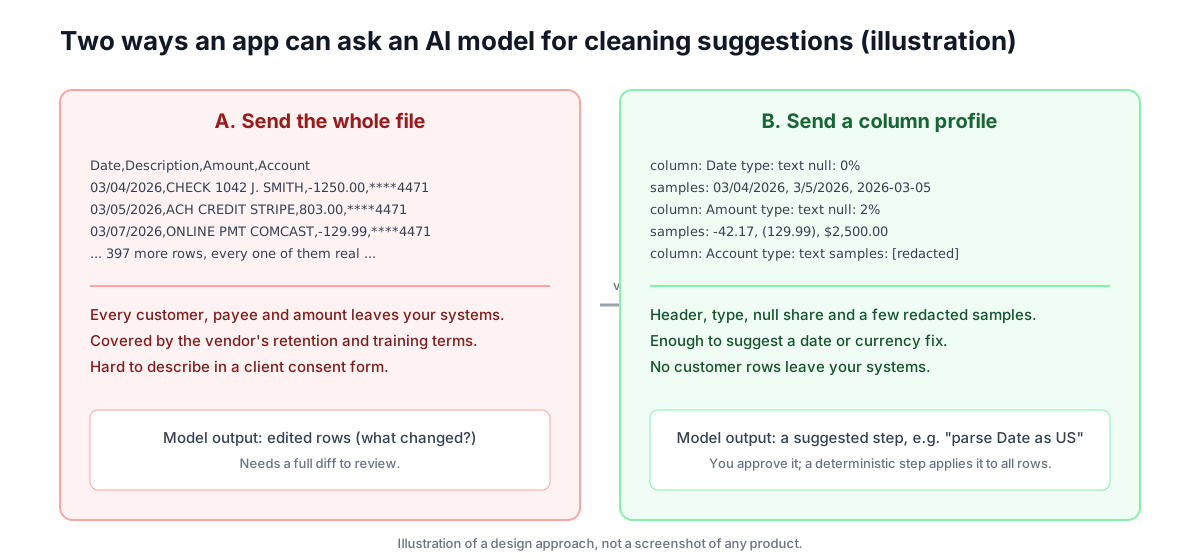
This is the approach we would hold any AI feature to, including our own if we build one: the model sees a profile, proposes a step, and a deterministic transformation applies that step to every row after you approve it. Today PipeSheets has no AI feature at all; every step is fixed and previewable, uploaded files are deleted automatically (after 7 days on the free tier, 30 days on paid), and you can delete them sooner. Nothing is sent to a model. We are describing the principle, not a shipped capability.
Can an AI tool silently change financial values?
Yes, and this is the risk nobody's terms of service cover. When you ask a chat tool to "clean" a file and it hands back a new copy, you get no diff. In our own test of a 13-row sample (described in our Excel comparison), the assistant blanked the category value "None" as if it were a null and removed a row, and told us so; on a 13,000-row file you would not have that narration, and you would not know which cells moved. Even non-AI tools make this mistake: in our testing, DuckDB 1.5.6 read the text 03/04/2026 as April 3, day-first, with no warning. Ambiguity in financial data should produce a flag, never a guess.
A practical workflow that passes the checklist
If you want to use AI on financial files without failing the questions above:
- Use a business or API tier whose terms you have read, or a tool that never sends data to a model.
- Add the tool to your WISP and risk assessment. Use the IRS Publication 5708 template if you do not have one.
- If you prepare returns, get written §7216 consent before client return information goes anywhere outside your systems, or keep it out of AI tools entirely.
- Ask the model for a transformation (a formula, a Power Query step, a script) rather than edited data, and send it a redacted sample rather than the file. We show the full workflow in a separate how-to on cleaning a CSV with AI without uploading it.
- Check row counts before and after every step, and require ambiguous values to be flagged.
For the mechanical part of the job, cleaning a bank export so it imports cleanly, the bank statement CSV cleaner page shows the deterministic route: no model, previewable steps, and files that expire on a schedule you can see.
Related guides
- SI vs AI vs Superintelligence: A Plain-English GlossarySince Executive Order 14434, "SI" is the US federal government's term for what everyone else calls AI. It is not the same as superintelligence, and it collides with several older meanings. This glossary defines each sense, with the source for each definition.
- Reusable Monthly CSV Cleaning Pipelines for Accountants and BookkeepersMonth-end means the same messy exports every time. Instead of a fresh Excel session, document your cleanup steps once as a saved pipeline and re-run it on each client's bank, Stripe, and PayPal CSV.
- AI Is Now "SI": What the Super Intelligence Rename Means for Small BusinessesNo law or contract changed. Executive Order 14434 only changes the words federal agencies use: "Super Intelligence" and "SI" instead of "Artificial Intelligence" and "AI". Here is exactly what the order says, what it leaves alone, and the practical steps for a small business.
- Xero Bank Statement CSV Mapping: Date, Amount, Debit/Credit, and Skipped RowsXero's manual bank statement import needs a Date column and an Amount column, mapped to the right fields at the mapping step. Here's how to fix date-format mismatches, choose single-amount vs debit/credit layout, and stop Xero from silently skipping rows.
Try the automated solution
PipeSheets can fix these issues automatically. Create a free account to clean your first file.
Create a free accountOr see how it works: Bank Statement CSV Cleaner