AI Bank Reconciliation: What It Can Match, and What It Can't
AI bank reconciliation can reliably match a bank line to an invoice or bill when the amount, date and payee line up one-to-one, and the leading tools say so themselves: they auto-reconcile only when confident and leave the rest for you. What it cannot yet do well is the messy part of a small business's bank feed: a Stripe deposit that nets fees, refunds and disputes against many sales, or a single customer payment that covers several invoices. This post explains how the AI layer decides, where it stops, and what to do about the gap, with a worked example you can check by hand.
This article describes software behaviour and arithmetic. It is not accounting advice. Vendor claims are quoted as claims, with dates; we have not audited any vendor's accuracy.
How AI bank reconciliation decides a match
Strip away the marketing and every product uses the same ladder, from most certain to least:
- Rules you wrote. "Description contains COMCAST, amount under 200: Utilities." Deterministic, and yours.
- Exact match. A bank line equals an open invoice, bill or transfer already in the ledger, on amount and roughly on date.
- Your history. The tool copies how you treated similar lines last month.
- Prediction from other users. The tool guesses from what other customers did with similar descriptions.
- A review queue for everything below the confidence bar.
Xero's documentation names its four methods exactly that way. Its US reconciliation page describes Rule ("one of your bank rules is applied"), Match ("a transaction matches an existing Xero document"), Memory ("JAX decides based on how you've reconciled similar transactions") and Prediction ("JAX suggests based on how other Xero users reconciled similar transactions"), and states that "JAX only automatically reconciles when it's highly confident." Note the privacy implication of Prediction: it is built on other customers' reconciliation history, so by the same token yours contributes to theirs.
QuickBooks Online does the same with different words. Its AI-powered banking page "suggests matches or categories when it has high confidence", and shows colour-coded Review Signals: a green check when "QuickBooks has strong data behind the suggestion, with a clear pattern in your history", blue when there is some data but variation, and orange when it "has limited data behind the suggestion". Even for green, the page tells you to confirm before you post. Bank rules sit underneath, with up to five conditions per rule and an auto-post option that Intuit's own help warns means "you won't get a chance to review transactions before QuickBooks adds them to your books".
So the honest summary of the industry pattern is: auto-match above a threshold, humans review the rest. The useful question is not "how accurate is the AI" (no vendor publishes an audited figure for your books) but "what lands in the review queue, and why".
What ends up in the review queue
| Case | Why it fails to auto-match | What resolves it |
|---|---|---|
| Processor deposit (Stripe, PayPal, Shopify) | The bank amount is net of fees, refunds and disputes across many sales; no single invoice equals it. | The processor's payout report, joined on the payout ID. |
| One payment, many invoices | The amount equals a sum of invoices, not any one of them. Xero's August 2026 update says this is still being worked on. | A split or a batch match, done by a person or by a rule on the remittance. |
| Partial payment or short-pay | Amount is less than the invoice; a match would leave a balance the tool cannot explain. | A partial match plus a note. |
| Transfers between your own accounts | Two bank lines, no invoice; tools usually handle it, but only if both feeds are connected. | A transfer match. |
| Date drift | Invoice dated the 28th, cash arrives the 3rd of next month, across a period end. | A date window, which rule engines allow and exact matchers do not. |
| Description noise | "POS PURCHASE AMZN Mktp US*2K4L7" versus last month's "AMZN Mktp US*9Q1". Memory keys on text that changes every time. | A rule on a stable substring, not the whole description. |
The first row is the one that generates the most support tickets, and Xero is candid about the second: its August 2026 product update says "Auto Bank Reconciliation continues to improve, but there's still more work to do" and that the team is "tackling more complex use cases, like scenarios where a single payment covers multiple invoices."
Worked example: why a $1,000 day lands as an $803 deposit
Here is the arithmetic that defeats a matcher working from the bank line alone. Rates are assumptions for the example: Stripe's US pricing page lists 2.9% + 30¢ per successful domestic card transaction and a $15 fee when you receive a dispute, and states that original processing fees "are not returned" on a refund. Your account's rates may differ.
Ten card charges, gross                     1,000.00
Percentage fee   2.9% x 1,000.00          -    29.00
Fixed fee        10 x 0.30                -     3.00
Refund of one sale (fee not returned)     -    50.00
Dispute, funds held                       -   100.00
Dispute fee                               -    15.00
                                          ----------
Net to Stripe balance, paid out              803.00

Check: 1,000 - 32 = 968; 968 - 50 = 918; 918 - 100 = 818; 818 - 15 = 803.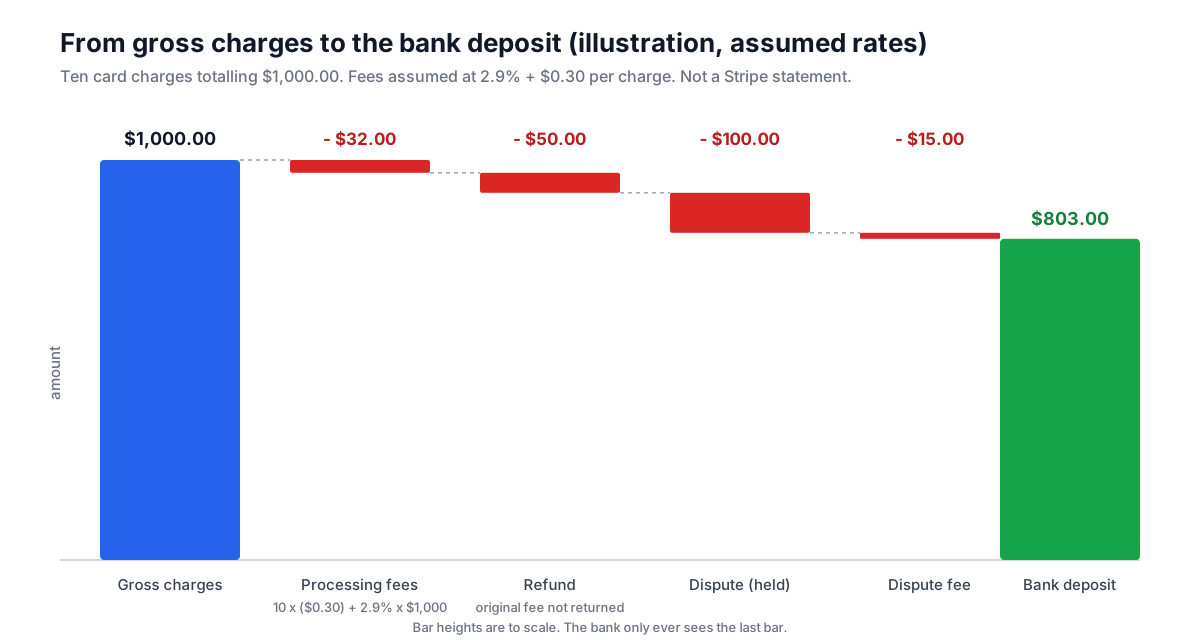
The bank statement shows 803.00. The sales ledger shows ten invoices totalling 1,000.00, one refund and one dispute. No amount-based matcher, AI or otherwise, can connect those from the bank line, because the information is not in the bank line. It is in Stripe's payout reconciliation report, where every balance transaction (charge, refund, dispute adjustment, fee) carries the ID of the payout that settled it.
The data that actually resolves it: the payout ID
Stripe's payout reconciliation report exists for exactly this. Its itemised CSV lists "every payment, refund, dispute, fee, and other balance transaction included in the payout", and the column that ties them together is automatic_payout_id. Two constraints from the same page matter for small businesses: the report "is only available for users with automatic payouts enabled" (manual-payout accounts use the Balance report instead), and for instant payouts "Stripe can't identify which transactions are included in each payout", so you reconcile those yourself. The report also groups by the estimated arrival date shown on the Payouts page, not the date your bank posts the deposit, which is the usual reason a payout seems to be missing from the period.
With that file, reconciliation becomes a join: bank deposit to payout on amount and date, then payout to its balance transactions on automatic_payout_id. We have written up the mechanics in three earlier guides and will not repeat them here: merging bank, Stripe and PayPal exports for monthly reconciliation, Stripe payout CSVs for accounting, and what to do when Stripe deposits are double counted.
Where a deterministic tool fits, and where it does not
PipeSheets is not an AI reconciliation tool, and we want to be precise about what it does here. It merges exports on one exact key. If your bank export, your Stripe payout report and your sales export share a key (the payout ID, an invoice number, an order ID), PipeSheets joins them, up to 20 files and one million result rows, and shows you matched, unmatched-left and unmatched-right rows before you download. That is the join described above, and it is deterministic: the same files produce the same result every time, and nothing is sent to a model.
What it does not do today is tolerance matching (amount within 1%) or date-window matching (within 3 days). Those are the two tricks that rule engines in accounting software use for the drift cases in the table, and if you need them, use the accounting tool's rules, or the review queue. We would rather say that plainly than imply a feature.
Vendor accuracy claims, labelled
You will see percentages in vendor material. None of the ones we found were independently audited, and none were measured on a small business's bank feed with processor deposits in it, so treat them as marketing until a vendor shows its test set.
| Claim | Who made it | Who measured it |
|---|---|---|
| Auto-reconciles only when "highly confident" | Xero, product page (read 2026-10-10) | Xero; the threshold is not published |
| Suggests "when it has high confidence"; Review Signals show data strength | Intuit, QuickBooks help (read 2026-10-10) | Intuit; no accuracy figure published |
| "Still more work to do" on one payment covering multiple invoices | Xero blog, 2026-08-19 | Xero, about its own product |
| Goal to "automate over 90%" of routine tasks | Xero, vision statement | A goal, not a measurement |
A review routine that works with any tool
Whatever the AI layer does, run this at month end:
- Count the review queue by reason: processor deposits, multi-invoice payments, partials, transfers, unknown. The first two should shrink once you reconcile processors from their payout reports.
- For every processor deposit, tie the bank amount to one payout ID and check that the payout's net equals the deposit to the cent.
- Sample ten auto-matched lines and confirm them against source documents. If any is wrong, lower your trust in that method (Memory or Prediction) and add a rule instead.
- Keep the exports. If you ever need to re-run the month, a saved join on the payout ID beats re-training an assistant on your history.
To set up the join itself, the merge bank and Stripe exports page shows the one-key merge with its matched and unmatched views, and the bank statement CSV cleaner covers getting the bank side into a consistent date and amount format first, which is where most false non-matches start.
Related guides
- Stripe Deposits Double Counted? How to Fix Your BooksIf your books show more revenue than you actually earned, and Stripe is in the picture, you have almost certainly recorded the same money twice: once as Stripe payments and again as bank deposits. Here is why it happens, how to confirm it, and how to fix a ledger that is already double counted.
- Reusable Monthly CSV Cleaning Pipelines for Accountants and BookkeepersMonth-end means the same messy exports every time. Instead of a fresh Excel session, document your cleanup steps once as a saved pipeline and re-run it on each client's bank, Stripe, and PayPal CSV.
- Stripe Payout CSVs for Accounting: Gross, Fees, Net, and Matching Transfers to DepositsYour bank shows one Stripe deposit; Stripe made hundreds of charges. Here's how to pull the right report, split gross, fees, and net, and tie every payout to its bank line.
- Merge Bank, Stripe, and PayPal CSV Exports for Monthly ReconciliationMerging bank, Stripe, and PayPal CSVs for monthly reconciliation double-counts revenue unless you handle payouts correctly. Here is how to normalize all three to one schema and match payouts to deposits.
Related tools & guides
- Merge Bank & Stripe ExportsFinally match those Stripe payouts to your bank deposits
- Bank Statement CSV CleanerTurn messy bank exports into accounting-ready data
- PipeSheets CSV & Excel cleanerClean any spreadsheet in seconds — free to start
- Pricing & plansCompare the free and Pro plans for your workflow
Try the automated solution
PipeSheets can fix these issues automatically. Create a free account to clean your first file.
Create a free accountOr see how it works: Merge Bank & Stripe Exports